Contents Menu Expand Light mode Dark mode Auto light/dark mode
LuatOS documentation
(NEW) Go to English site
前往中文站点
Discord
Light Logo Dark Logo

💁 LuatOS Introduction

  • 🏠️ Home Page
  • 🕹️ Online Experience LuatOS
  • 🛠 LuatOS Tools Daquan
  • 💬 Technical Support

🌠 Quick to get started

  • 🌙 Lua Tutorial
    • Basic Grammar
    • LuaTask Framework
  • 🧮 Chips and Development Boards
    • 📊 Chip comparison and selection table
    • 📶 Air780EP(EC718P Series General)
      • Air780EP Module (EC718P Series General)
      • Hardware Data
      • LuatOS IO multiplexing configuration under firmware
      • Ec718p Series Firmware Release Notes
      • Air780EPV Additional instructions
      • Air780EPVH Additional instructions
    • 📶 Air780E(EC618 Series General)
      • Air780E Module (EC618 Series General)
      • Development Board
      • Hardware Data
      • Description of mass production brush machine
      • Network Characteristics
      • LuatOS IO multiplexing configuration under firmware
      • Air780EG Additional instructions
      • Air700E Additional instructions
      • TTS Description of the function
      • Firmware Description
      • FOTA Upgrade and generation of upgrade package
      • Air780E_PCB
      • EC618 Series Firmware Release Notes
    • 📶 Air780EP(EC718P Series General)
      • Air780ES Module
      • Air780EPS Module Firmware Release Notes
    • 📡 PC Simulator
      • Method of use
      • Code base for simulator
      • Generate and manage luadb files
    • 🚢 satellite navigation GNSS
      • Air510U
      • Air530Z
      • auxiliary positioning AGPS
      • Used with communication modules (such as 4G modules)
      • Introduction to Other Positioning Methods
    • Core Software LuaTools
      • Function introduction
      • LuaTools Version History
    • 🛴 Air001
      • Air001 Chip
      • Development Board
      • Hardware Data
      • Air001 Keil MDK-based user manual
      • Air001 Arduino-based user manual
      • Air001_PCB
    • 🚲 Air32F103
      • AIR32F103 Chip
      • Development Board
      • Hardware Data
      • Air32F103 Manual
      • Transplant from SXX32F103
      • Enhanced function instructions
      • DAPLink Manual
      • Air32F103_PCB
      • BluePill_PCB
    • 📡 Air601
      • Air601
      • Air601-12F Development Board
      • Air601 Hardware Data
      • Firmware Release Notes
      • About the mac address
      • Upgrade with the co-IoT platform
      • SPI SLOVAL FUNCTION
    • 🚗 Air101
      • Air101 Chip
      • Development Board
      • Hardware Data
      • Air101 Hardware Design Tutorial
      • Air101 Getting Started Manual
      • Air101_PCB
      • Air101 power consumption curve
    • 🚗 Air103
      • Air103 Chip
      • Development Board
      • Hardware Data
      • Function Description of Segment Screen/Segment Screen
      • Touch sensor/touch button
      • Air103_PCB
      • Air103 power consumption curve
    • 🚗 Air105
      • Air105 Chip
      • Air105 Development Board
      • Hardware Data
      • Air105_PCB
      • Air105 power consumption curve
      • Air105 Script Encryption
    • 📡 ESP32-C3
      • ESP32C3-CORE Development Board
      • Hardware Data
      • ESP32-C3_PCB
      • ESP32C3 power consumption curve
      • Replace flash tutorial
      • Issue Notes
    • 📡 ESP32-S3
      • ESP32S3-CORE Development Board
      • Hardware Data
      • ESP32-S3_PCB
      • Portable wifi data collection
    • 📡 RP2040
      • RP2040_PCB
    • 🚲 SWM181CBT6
      • SWM181CBT6 Chip
      • Development Board
      • Hardware Data
      • SWM181 Manual
      • SWM181_PCB
    • 📶 Air302
      • Air302 Module
      • Development Board
      • Hardware Data
    • 📡 Air640w
      • Air640w
      • Development Board
      • Hardware Data
    • 🚗 W806
    • Performance testing (based on coremark)
    • Equipment Support/Supported Devices
    • FAQ List
    • Air724UG
    • Air820UG
  • 🧷 Peripheral expansion data
    • Air10x Series Screen Expansion Board
      • Hardware Data
      • Use Example
    • EINK1.54 Ink screen
      • Hardware Data
      • Use Example
    • 1.8 TFT LCD resolution 128x160
      • Hardware Data
      • Use Example
    • 2.4 Inch TFT_ LCD color screen resolution 240x320
      • Hardware Data
      • Use Example
    • 1.54 Inch TFT_ LCD resolution 240x240
      • Hardware Data
      • Use Example
    • Air105 Supporting GC032A camera
      • Hardware Data
      • Use Example
    • Qualcomm Font Chip
      • Hardware Data
      • Use Example
  • 📚 Development Tutorial
    • recommend learning line
    • Construction of development environment
    • Burn Tutorial
    • API Tutorial
      • log
      • sys
      • adc
      • CRYPTO
      • fdb
      • DISP
      • i2c
        • air101
        • air103
        • air105
      • spi
        • air101
        • air103
        • air105
      • uart
        • air101
        • air103
        • air105
      • LCD Drive screen
      • mcu
        • air101
        • air103
        • air105
      • PM
      • pwm
        • air101
        • air103
        • air105
      • RTC
      • sfd
      • sfud
        • air101
        • air103
        • air105
      • timer
  • Firmware Download

📖 Reference Manual

  • 🍴 LuatOS-SOC Interface Documentation
    • Adaptation status
    • adc - Analog-to-digital conversion
    • antbot - Ant Chain
    • audio - Multimedia-Audio
    • bit64 - 32 Basic arithmetic and logical operations on 64-bit data on bit systems
    • camera - Camera
    • cc - VoLTE Call function
    • codec - Multimedia-Codec
    • coremark - Running points
    • crypto - Encryption and decryption and hash functions
    • dac - Digital-to-analog conversion
    • disp - disp Library (Obsolete)
    • eink - ink screen operation library
    • ercoap - New Coap Protocol Parsing Library
    • errDump - Error reporting
    • fastlz - FastLZ Compression
    • fatfs - read/write fatfs format
    • fdb - kv Database, power failure does not lose data
    • fonts - Font Library
    • fota - Underlying Firmware Upgrade
    • fs - Additional File System Operations
    • fskv - kv Database, power failure does not lose data
    • ftp - ftp Client
    • gmssl - national secret algorithm(SM2/SM3/SM4)
    • gpio - GPIO Operation
    • gtfont - Qualcomm Font Chip
    • hmeta - Hardware metadata
    • ht1621 - LCD Driver(HT1621/HT1621B)
    • http - http Client
    • httpsrv - http Server
    • i2c - I2C Operation
    • i2s - Digital Audio
    • iconv - iconv Operation
    • io - io action (extended)
    • ioqueue - io Sequence operation
    • iotauth - IoT Authentication library, used to generate parameters for various cloud platforms
    • ir - infrared remote control
    • json - json Generating and parsing libraries
    • keyboard - Keyboard Matrix
    • lcd - lcd Drive module
    • lcdseg - Segment lcd
    • libcoap - coap Data processing
    • libgnss - NMEA Data processing
    • little_flash - LITTLE FLASH Software package
    • log - Logstore
    • lora - lora Drive module
    • lora2 - lora2 Driver module (supports multi-hanging)
    • lvgl - LVGL Image Library
    • max30102 - Heart Rate Module(MAX30102)
    • mcu - encapsulation mcu some special operations
    • miniz - Easy zlib compression
    • mlx90640 - infrared temperature measurement(MLX90640)
    • mobile - Cellular Network
    • mqtt - mqtt Client
    • natp - Network Address Port Translation (under development)
    • nes - nes Simulator
    • nimble - Bluetooth BLE library (nimble version)
    • onewire - single bus protocol driver
    • os - os Operation
    • otp - OTP Operation Library
    • pack - Packing and unpacking format string
    • pin - Pin Naming Map
    • pm - Power Management
    • protobuf - ProtoBuffs Codec
    • pwm - PWM Module
    • repl - “Read-evaluate-output “loop
    • rsa - RSA encryption and decryption
    • rtc - Real Time Clock
    • rtos - RTOS underlying operation library
    • sdio - sdio
    • sensor - Sensor Operation Library
    • sfd - SPI FLASH Operation Library
    • sfud - SPI FLASH sfud Software package
    • sms - SMS
    • socket - Network Interface
    • softkb - Software Keyboard Matrix
    • spi - spi Operation Library
    • spislave - SPI From machine
    • sqlite3 - sqlite3 Database Operations
    • statem - SM State Machine
    • string - String Manipulation Functions
    • sys - sys Library
    • sysplus - sys A strong complement to the library
    • timer - Operating the bottom timer
    • touchkey - Touch keys
    • u8g2 - u8g2 graphics processing library
    • uart - serial port operation library
    • ulwip - lwip integration in user space (under development)
    • usbapp - USB Functional operation
    • w5500 - w5500 Ethernet driver
    • wdt - watchdog Operation Library
    • websocket - websocket Client
    • wlan - wifi Operation
    • wlanraw - WLAN Data RAW Transfer
    • ws2812 - Phantom Lights with RGB Controller (WS2812 Series)
    • xxtea - xxtea encryption and decryption
    • ymodem - ymodem Agreement
    • zbuff - c Memory Data Manipulation Library
    • zlib - zlib Compression/Decompression (Obsolete)
  • 📮 sys System Messages
  • 🌕 Native API Manual
  • 👓 CSDK Development Manual
  • 🥢 Extended Library Interface Documentation
    • ads1115 - ads1115 analog-to-digital converter
    • ads1115plus - ADS1115 Drive
    • adxl34x - adxl34x 3 Axis accelerometer currently supports adxl345 adxl346
    • aht10 - aht10 Temperature and humidity sensor
    • air153C_wtd - Add software watchdog function to prevent crashes
    • airlbs - airlbs Location services (fee-based services, you need to contact the sales application)
    • ak8963 - ak8963 geomagnetic sensor
    • aliyun - AliYun Alibaba Cloud IoT Platform
    • am2320 - am2320 Temperature and humidity sensor
    • ap3216c - ap3216c Light sensor
    • bh1750 - bh1750 Digital light intensity sensor
    • bmx - bmx The air pressure sensor currently supports bmp180 bmp280 bme280 bme680 will automatically judge the device
    • cht8305c - cht8305c Temperature and humidity sensor
    • ds3231 - ds3231 Real Time Clock Sensor
    • ec11 - ec11 Rotary encoder
    • gt911 - gt911 Drive
    • gy53l1 - gy53l1 laser ranging sensor
    • httpdns - Domain name resolution using Http
    • httpplus - http Supplement to the library
    • ina226 - ina226 Drive
    • iotcloud - iotcloud Cloud platform library (supported: tengxun cloud ariyun onenet huawei cloud graffiti cloud baidu cloud tlink cloud others will also support, and the useful issue will accelerate support )
    • l3g4200d - l3g4200d Three-Axis Digital Gyroscope Sensor
    • lbsLoc - lbsLoc Sending Base Station Location Request
    • lbsLoc2 - base station positioning v2
    • libfota - libfota fota Upgrade
    • libfota2 - fota Upgrade v2
    • libnet - libnet synchronous blocking api based on the socket library, the socket library itself is asynchronous non-blocking api
    • lis2dh12 - lis2dh12 Three-axis sensor
    • lm75 - lm75 Temperature Sensor Support lm75a lm75b
    • max31856 - max31856 Thermocouple temperature detection
    • mcp2515 - mcp2515 CAN Protocol Controller Driver
    • mlx90614 - mlx90614 infrared temperature
    • mpu6xxx - mpu6xxx Six-axis/nine-axis sensor support mpu6500,mpu6050,mpu9250,icm2068g,icm20608d
    • necir - necir NEC protocol infrared receiving
    • netLed - netLed Network status indicator
    • pca9685 - pca9685 16 Road PWM drive steering gear
    • pcf8563t - pcf8563t Clock Module
    • pcf8574 - pcf8574 IO Extension
    • qmc5883l - qmc5883l geomagnetic sensor
    • rc522 - rc522 Non-contact read/write card driver
    • rtkv - Remote KV Database
    • sc7a20 - sc7a20
    • shift595 - shift595 74HC595 Chip
    • si24r1 - si24r1 Drive
    • spl06 - spl06_01 Air pressure sensor
    • tcs3472 - tcs3472 Color Sensor
    • tm1637 - tm1637 Digital tube
    • tm1640 - tm1640 Digital tube and LED driver chip
    • tm1650 - tm1650 Digital tube and key scanning chip
    • tsl2561 - tsl2561 light intensity sensor
    • udpsrv - UDP Server
    • vl6180 - VL6180 laser ranging sensor
    • xmodem - xmodem Drive
    • ze08g_ch2o - ZE08G-CH2O electrochemical formaldehyde module
    • zh07 - ZH07 Laser Dust Sensor
  • Community Extension Library

🖥️ Kernel Development

  • 👨‍💻 Compile source code
    • ☁️ Cloud Compilation
    • 📶 Air780E Compilation Guide
    • 📶 Air780EP Compilation Guide
    • 🚗 Air101 / Air103
    • 🚗 Air105
    • 📡 ESP32 Series Compilation Document
    • 🖥️ Win32
    • 🖥️ Linux
    • 📡 Air640w
    • 📶 Air302
  • 📁 Development documentation
    • Development practice
      • Add Custom Functions (Rapid Edition)
      • Add custom libraries and functions (full version)
      • Lua Library File Writing Guide (Pure Lua Writing)
      • C Interface implements Task waiting function
      • Command Line Brush Guide
    • Development Information
      • LuatOS-SoC The file system
      • Explain lua’s string and hex data (hexadecimal)
      • LuaDB File Format
      • LuatOS-SoC Common Firmware Format soc
  • ❤️ Contribution Code
    • Coding Specification
    • Add New Library
    • Design Document
      • Core Layer
        • Luat Core
        • Luat Debugger
        • File System
        • Memory Pool
        • Message Bus
        • Luat Platform layer
        • Power and Low Power Management
        • Luat Timer
        • C style buffer
        • C Interface implements Task waiting function
        • C The Structure of Style
      • Peripherals API
        • GPIO
        • IR
        • SPI
        • UART
        • WLAN

💼 actual combat reference

  • ⌨️ Application Development
    • Peripherals
      • LuatOS-Soc Driver WS2812 Tutorial
    • lvgl
      • LVGL for LuatOS Manual
      • Introduction
      • LVGL Foundation
      • LVGL Components
      • LVGL Advanced
      • Precautions
    • Video playback
      • Air105 Video playback

🗄️ Other information

  • ⏳ IoT Power Power consumption test artifact
    • 🔋 IoT Power - V1
    • ⚡ IoT Power - CC
      • Technical indicators
      • Connection and assembly
      • Operating Instructions
      • FAQ
    • 🔍 Version Comparison
    • 🖥 PC Client
  • 🗃️ Data Archiving
    • Luat Framework
    • Luat framework (advanced-underlying mechanism)
    • Lua 5.3 Reference Manual
Back to top

DAPLink Manual#

Go to Taobao to buy

Warning

⚠Special instructions: please pay attention to users who deliver goods before June 17, 2023:

Expand View

Due to the wrong resistance attached to the first batch of boards, high-speed download cannot be used. If it meets the requirement ofdelivery before June 17, 2023, the government will reissue the revised DAPLink free of charge (the received boards do not need to be returned) The plan will avoid issuing single coupons and notify you by unified text message. If you have any questions, please go to the purchasing platform to consult customer service.

The solution for using this batch of burners is as follows:

  1. Change the low speed to use, the speed needs to be as low as possible

  2. Throw it away. Use a new replacement

  3. Self-replacement resistance is 100 Ω, which is equivalent to Bai Piao’s debugger, as shown in the following figure:
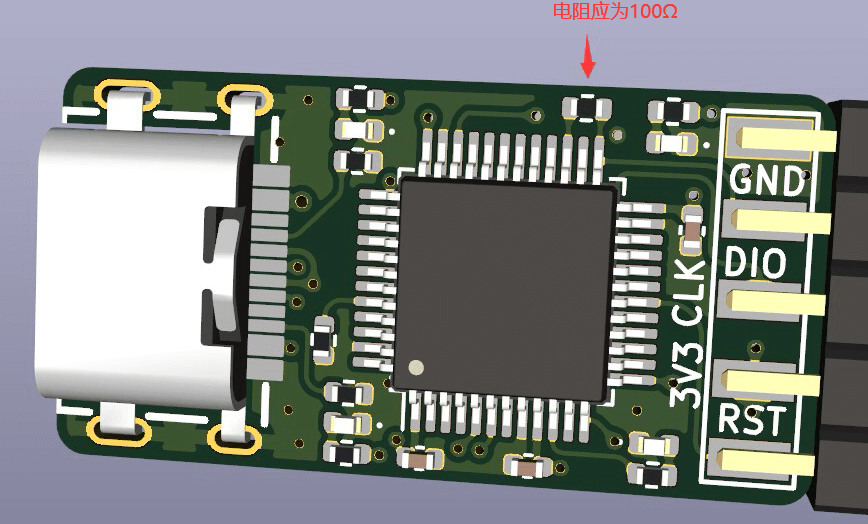
error_res

Overview#

DAPLink It is an official open source debugger scheme of ARM, with the official address of ARMmbed/DAPLink (github.com). It can be used to debug almost all single chip computers of arm cortex kernel. The latest M33 and M85 kernels also support debugging.

Based on ARM’s official code, Zeus was transplanted to Air32F103CBT6 and adapted the resources of 216M dominant frequencyand96K large RAM, supporting faster download speed (firmware open source), and designed an ultra-small DAPLink hardware
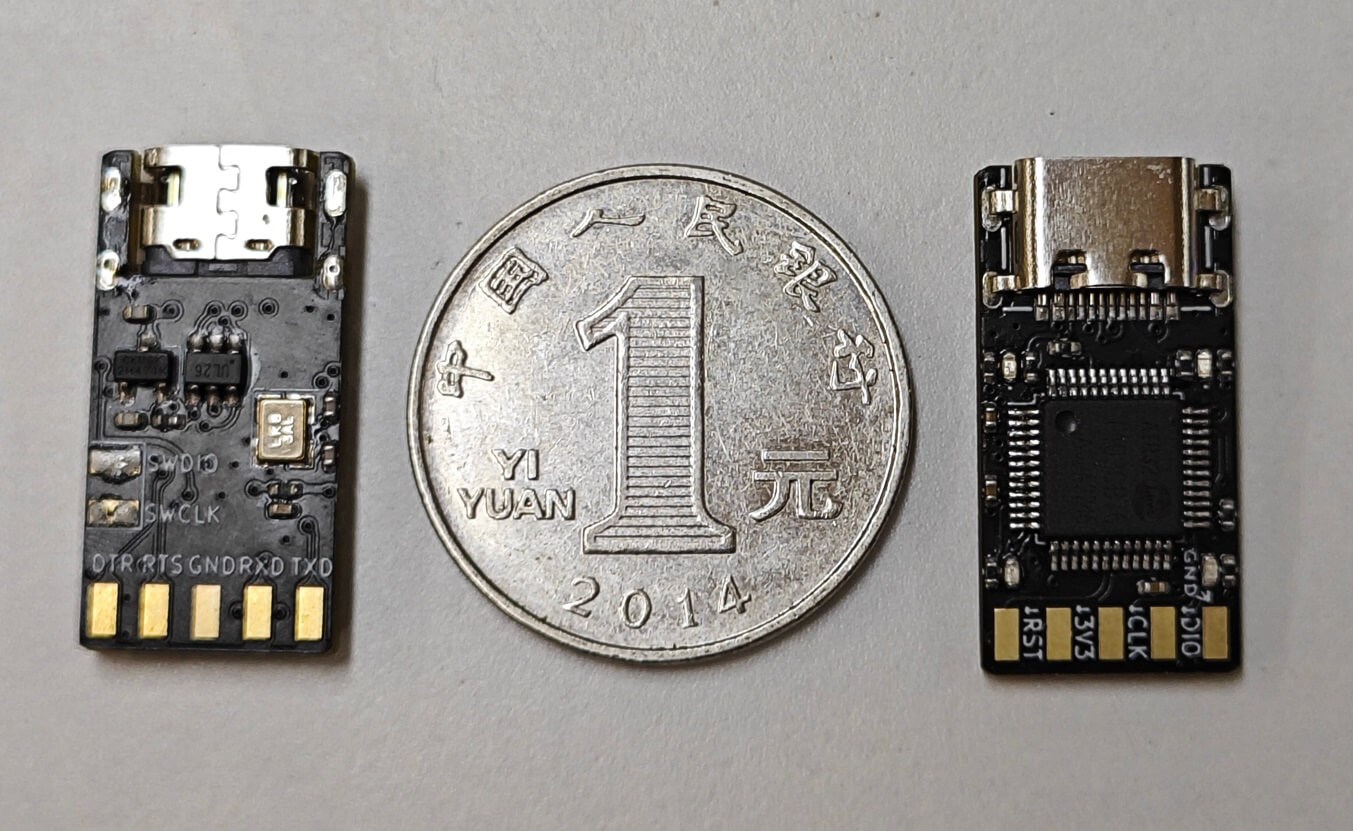
img

Main functions#

  • **The whole series of **Arm-cortex core chip debugging and burning, ARM official maintenance, follow-up new kernel will still support

  • A full-featured USB to serial port(CDC) with hardware DTR and RTS for automatic download

  • With U disk drag and drop burn function, you can directly drag hex or binfile to U disk to burn (only support burn CBT6)

  • Adapt to DAPLink V2 WINUSB version, the speed is 3 to 10 times higher than HID version, greatly saving download time

  • Support WEBUSB function, can burn firmware on web pages, support insertion of pop-up windows, no need to worry about not using it

  • Support Keil,IAR,PyOCD and other debugging environment
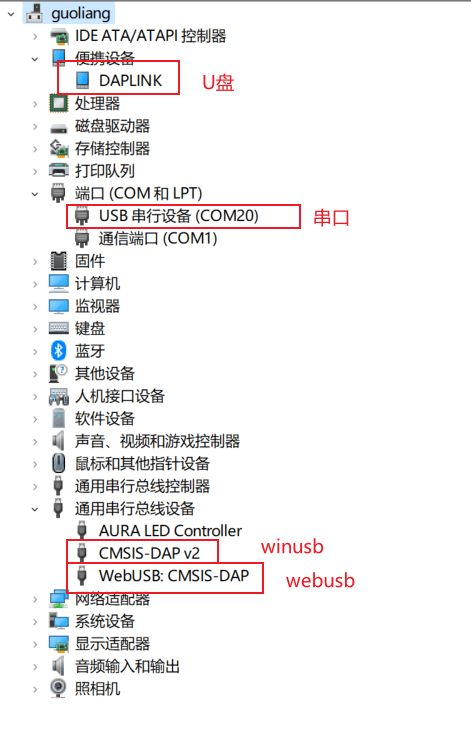
img

Hardware#

  • The size is only 2.5*1.3cm, which is smaller than USBA mouth.

  • Use 4-layer gold PCB design

  • Selection of sink TYPEC mouth more solid and stable

  • USB The port uses TI’s ESD chip protection

  • **High-current LDO **can provide power supply for external equipment while stably supplying power to air32
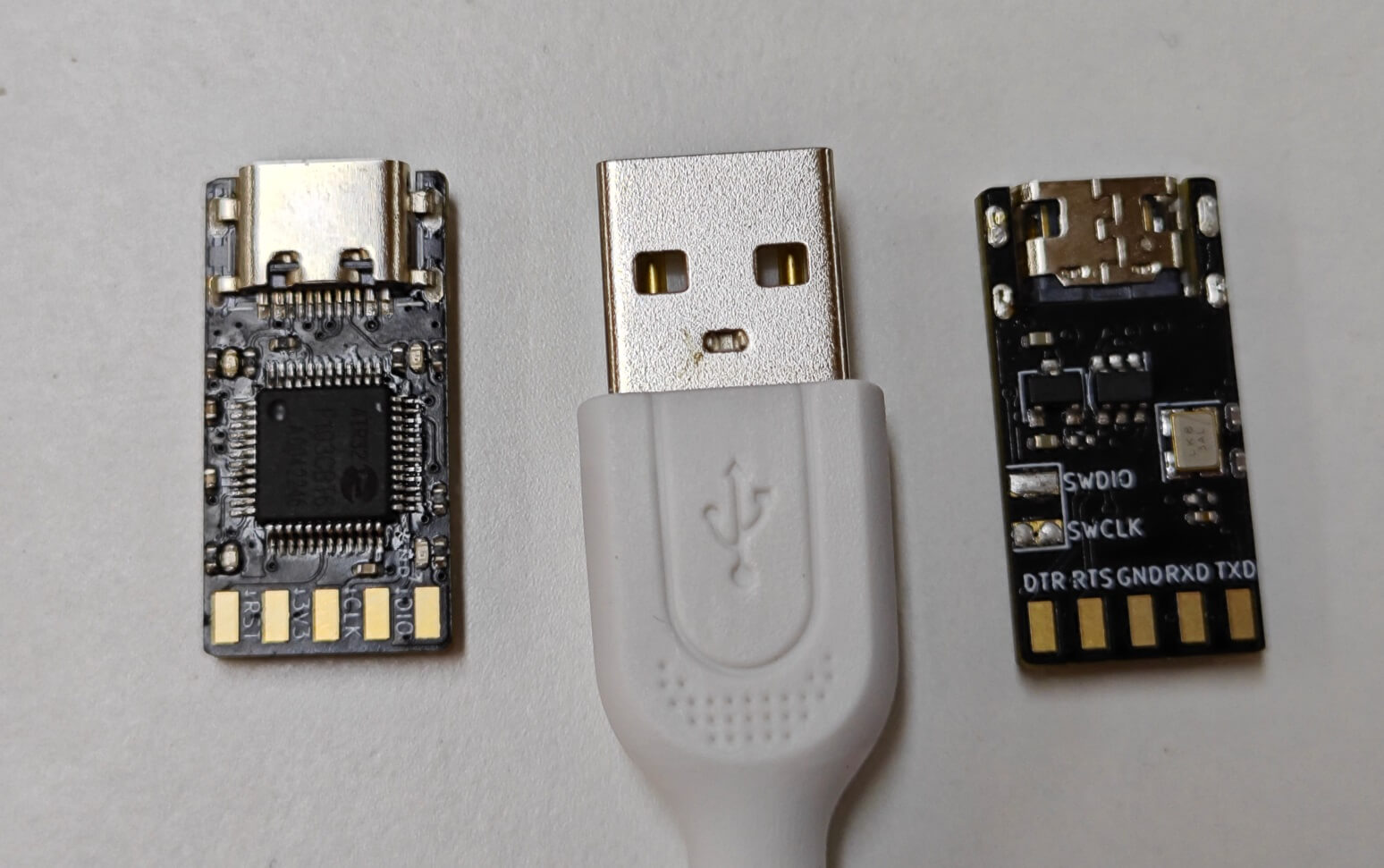
img

Four LED functions are:

  • dap Running indicator light, always on

  • Serial port CDC indication, flashing when serial port has data

  • DEBUG Illuminates when indicating, burning or debugging

  • MSC U The disk burning function indicator flashes when there is data.

Open Source Tutorial#

It’s so easy to use. I want to learn to make one myself, of course. All the information of the DAPLink of open source, all the software and hardware are open source.:

  • software open source

  • Hardware open source

In order to enable Xiao Bai to learn, the great god of porridge also kindly recorded a complete tutorial on PCB design for everyone. using the all-open source KICAD design software, from drawing symbols, drawing schematic diagrams, drawing PCB, routing, making production documents, to how to place an order for proofing for the whole process teaching, follow the tutorial and easily learn the design of 4-layer boards.

Tutorial Address: Collection KiCad7.0 Tutorial-Production DAPLink

Using the Tutorial#

DAPLink The pin functions are assigned as follows
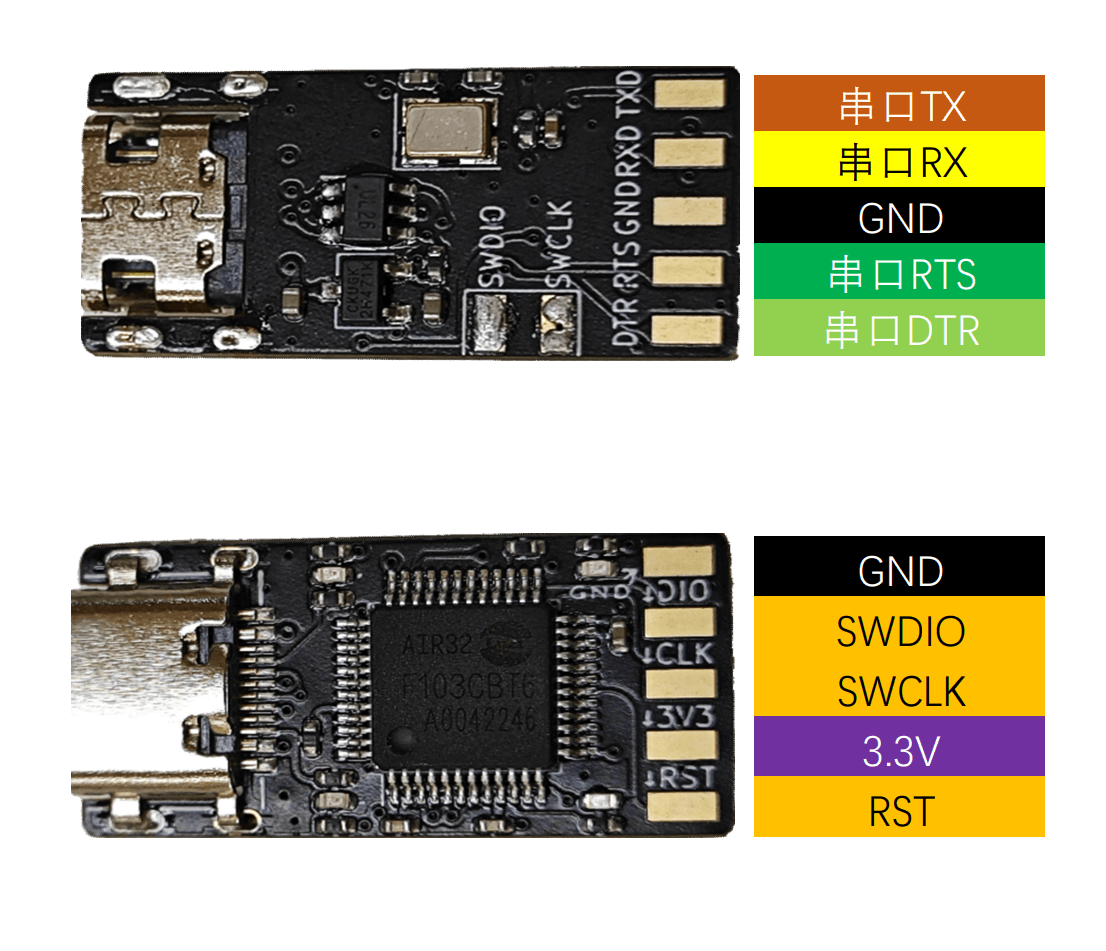
image-20230601135449140

Note

Since the design is only suitable for 3.3V level, if 5V equipment is connected for debugging, the risk of burning shall be borne by oneself.

KEIL Configuration#

Click the project configuration magic wand, find the Debug tab, select the CMSIS-DAP Debugger in the drop-down list, and click Settings
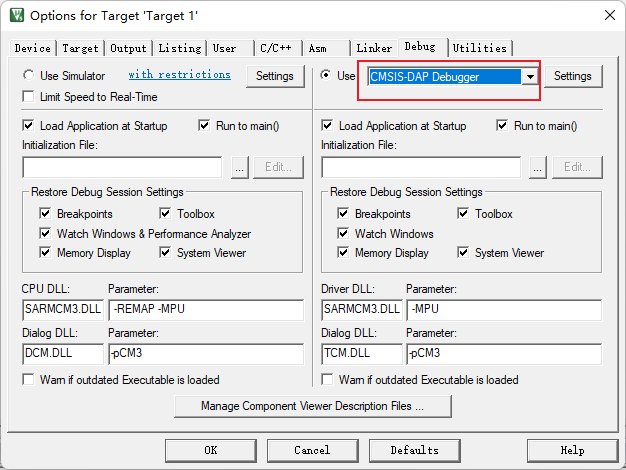
image-20220605110335656

Check whether the device is connected normally. If the connection is normal, you can see the device in the SW Device list, and you can adjust the clock speed to improve efficiency.

Note

Since this DAPLink uses the actual setting speed, if the device list is empty, it may be because the debugged chip cannot support higher frequencies, and can be used after lowering the frequency.
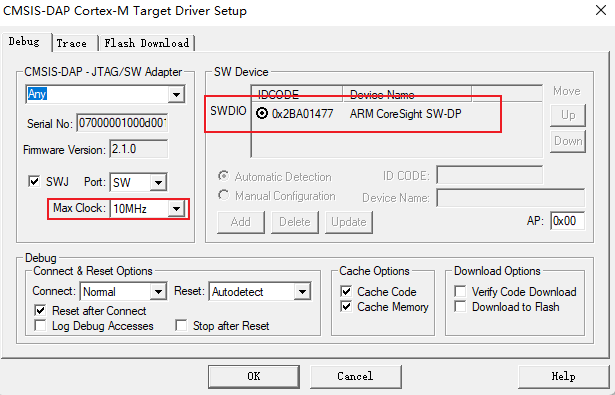
image-20220605112459682

Update Firmware#

If the BUG is fixed later, the DAPLink firmware will be updated. At this time, we need to perform the following operations.

Note

Some computer systems are still using Win7 and cannot use DAPLink V2 version firmware. At this time, it is necessary to downgrade to V1 firmware.

  1. Get the firmware you need from Air32 SDK Warehouse, please select the firmware at the end of iap.hex

  2. Short DAPLink board RST GND

  3. Plug in the USB, a USB memory called MAINTENANCE will appear on the computer

  4. Disconnect the short connection between RST and GND

  5. Copy the firmware file at the end of iap.hex into this USB memory

  6. After copying for a few seconds, the DAPLink will be upgraded, and after a few seconds, it will automatically reconnect and the upgrade will be completed.

FAQ#

There is no driver on the plug-in computer#

  • If it is a WIN7 device, you recommend brush it into v1 firmware according to the above tutorial, or study how to install the driver yourself.

  • If connected, the serial device name is mdeb Serial Port, and the WINUSB driver cannot be automatically recognized. If the drive is contaminated, the solution is as follows:

    • Device Manager-Serial Ports (COM and LPT)-mdeb Serial Port(COMxx)-Right-click-Uninstall device, check Delete driver software for this device, and click OK

    • Device Manager-Universal Serial Bus Controller-a device at the beginning of mdeb-Right-click-Uninstall device, checkDelete the driver software for this device, click OK

    • Click the Scan for Hardware Changes button above Device Manager

Device Manager has a device, but KEIL does not recognize it#

Please upgrade to the version after 2021 KEIL

Or just like in the previous question, using a fake driver

The device manager has devices, and KEIL is the latest version, but it still doesn’t recognize it.#

It may be a windows driver identification problem, which can be operated as follows:

  1. Open `Device Manager``

  2. Expand Universal Serial Bus Controllers

  3. You may see one or more.USB Composite Device

  4. Double-click one by one to open them, cut to the “Details” tab, and change the “Properties” to the “Device Instance Path”`

  5. If the display contains USB\VID_0D28 & PlD_0204\content, the device is DAPLINK

  6. On the device-Right-click-Uninstall device, click OK

  7. Click the Scan for Hardware Changes button at the top of the device manager, and you can identify it in KEIL after re-identification.

Device Manager has a device, but the openocd does not recognize it#

Please upgrade to the latest version after 2023 openocd

The burner is connected, but the debugged board is not displayed in the KEIL device list.#

  • The chip being debugged cannot support higher frequencies and can be used after lowering the frequency.

  • SWD function is turned off on the board being debugged

keil Download Times RDDI-DAP Error Solution#

DAPLink and MDK, the solution can try the following methods: Alt text
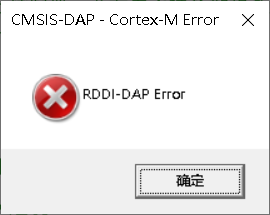
  1. SWD Debug Line Problem:

    • Many people will say that I have no problem with other DAPLINK, because DAPLINK V1 version is very slow and has no requirements for lines.

    • *The DuPont wires of SWD and SCK are separated and scattered (one by one), * or SWD VCC SCK GND or VCC SWD GND SCK are connected side by side in this way, and the data lines are as short as possible.

  2. connect the reset line of MCU

  3. MDK Software Configuration Issues:

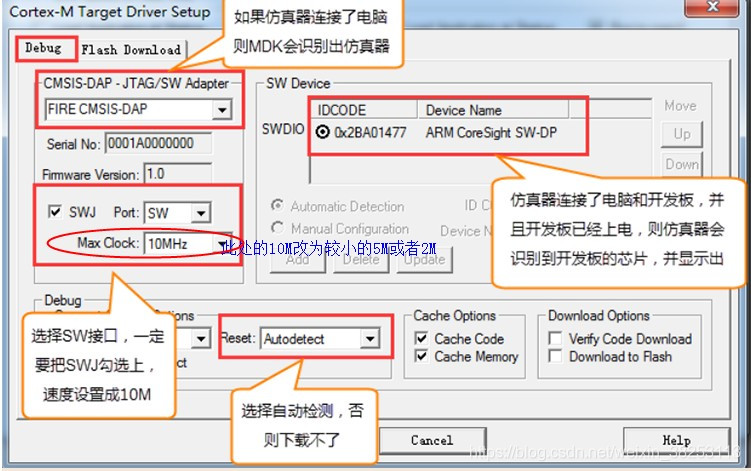
    • Set as shown below: 1693110272390

    • Adjust the speed of Max Clock, some MCUs only support 100K

  4. MDK Version issues

    • Update MDK to 5.36 or later version

    • Open the pack installer in keil; Select the corresponding device and update the pack, including cmsis, to the latest.

Next
📡 Air601
Previous
Enhanced function instructions

Copyright © LuatOS team | 下载离线版文档
Contents
  • DAPLink Manual
    • Overview
    • Main functions
    • Hardware
    • Open Source Tutorial
    • Using the Tutorial
      • KEIL Configuration
      • Update Firmware
    • FAQ
      • There is no driver on the plug-in computer
      • Device Manager has a device, but KEIL does not recognize it
      • The device manager has devices, and KEIL is the latest version, but it still doesn’t recognize it.
      • Device Manager has a device, but the openocd does not recognize it
      • The burner is connected, but the debugged board is not displayed in the KEIL device list.
      • keil Download Times RDDI-DAP Error Solution